Author Archives: Kheirul Mohamed

Mee Udang Kuala Sepetang Mak Jah

Assalamualaikum,

Sebenarnya dah bertahun dengar cerita pasal Mee Udang Kuala Sepetang ni tetapi belum pernah pergi lagi sebelum ni. Alhamdulillah, masa kami dalam perjalanan balik ke KL dari Krabi, kami berkesempatan juga untuk singgah di Kuala Sepetang untuk mencuba kehebatan Mee Udang Kuala Sepetang yang famous tu.

Sepanjang jalan ke Kuala Sepetang tu memang banyak gerai-gerai dan restoran-restoran yang menjual mee udang tetapi kami tertarik dengan Restoran Mee Udang Mak Jah sebeb kami tengok happening sangat so kami singgah la kat situ dan lagi satu restoran ni bersebelahan dengan surau dan mempunyai parking space yang luas.
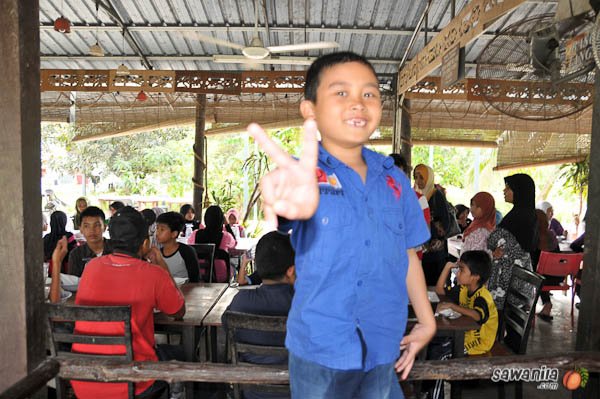
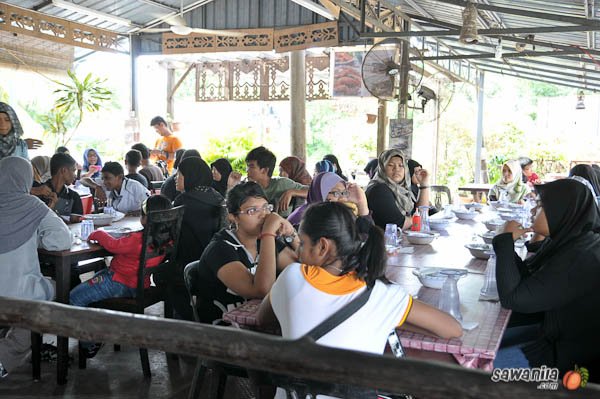
Suasana Restoran Mee Udang Mak Jah ni memang happening, kalau agak-agak saya lebih seratus orang boleh makan dengan selesa. Kami sekeluarga ambil tempat makan bersila dan apa yang cukup kami puas hati adalah layanan dari pembabtu restoran yang cukup pantas untuk ambil order.

Sungguh menakjubkan, tak sampai 5 minit minuman yang kami order sampai. Saya dan Ashraff minum tembikai laici manakala Yatie dan Afriena minum Carrot Susu. Air tembikai laici dia memang superb class… pekat likat manis memang 5 star punye…. carrot susu pon memang terbaik…. puas hati minum….

Meh kita tengok apa yang kami order tempoh hari…
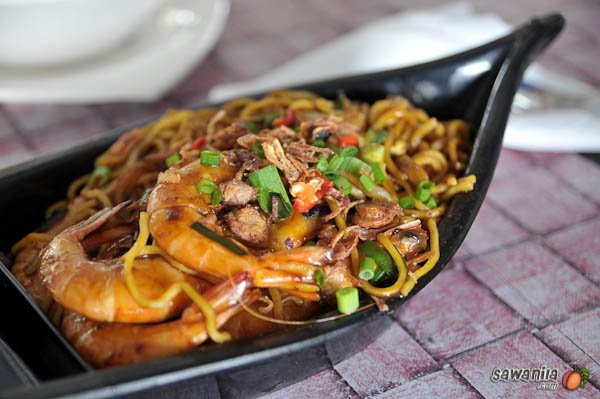
Mee Goreng Udang Special – RM11

Mee Goreng Udang Special memang sedap sekali. Udangnya sememangnya super fresh. Mee goreng yang digoreng sempurna, cukop rasa padas, masin, manisnya cuma mee itu rasa berkapur sedikit. Mengikut kata Yatie, oleh kerana udangnya bersaiz besar, ia kurang masak sedikit. Kalaulah udang tu digoreng lebih lama sedikit lagi ngam dan kalau dipecahkan telur sebiji digoreng bersama, memang meletop punya. Secara keseluruhan dia memang sedap gaks la……

Mee Udang Special – RM11

Sekarang ni saya nak bagi ulasan pasal Mee Udang Special ni skit….
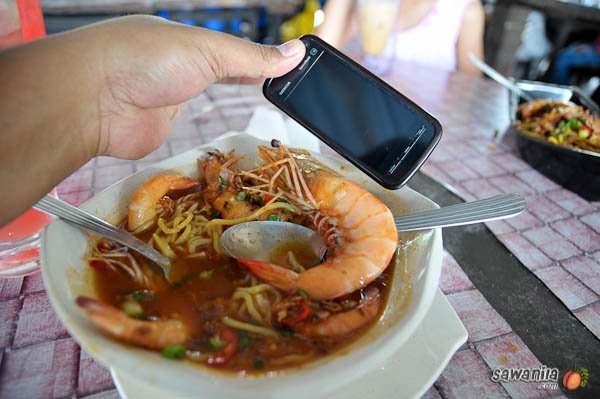
Udang Bersaiz Giant

PUJIAN dahulu……

  1. Udang Bersaiz Giant – memang betul-betul besar dan betul-betul super fresh. tengok sendiri lah gambar kat atas tu… udangnya lagi besar dari tepon saya…
  2. Udangnya banyak – memang betul orang cakap.. selak udang baru nampak mee
  3. Kuahnya sedap – saya hirup kuah sampai licin.. kuahnya light taste tapi cukop semua rasanya.. Ada masam-masam skit, manis-manis skit, pendek kata secukup rasalah.

KOMEN skit

  1. Ada udangnya yang terkurang masak – maybe saiz udang yang giant tu menjadi penyebabnya. Udang yang bersaiz lebih kecil sedikit memang PERFECT masak.. cuma yang saiz giant aja yang terkurang sedikit masaknya.. apa apa pon masih boleh dimakan dengan dibiarkan terendam dalam kuah panas tu…
  2. Muncung udang tu kalau dipotong sedikit dan dibuang utak udang tu lagi NGAM.. sebab otak udang tu mengganggu sedikit rasa kesedapan udang yang fresh tu.. tapi kan.. itu tak jadi masalah.. kalau tak suka kepala udang tu… letak tepi jer… heheheh
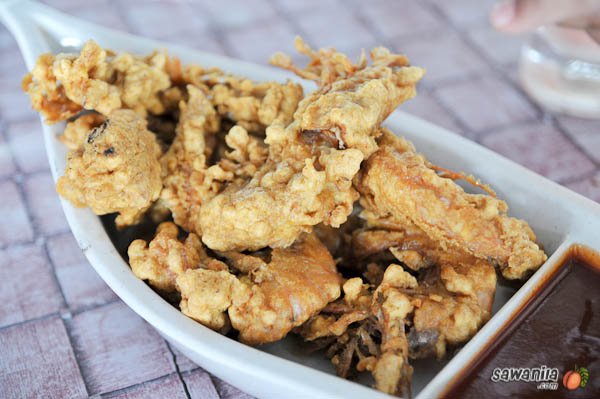
Udang Goreng Tepung Special – RM12

Ok.. Untuk Udang Goreng Tepung Special… apa yang boleh saya katakan kat sini.. memang SUPERB terbaik lah…. udang digoreng PERFECT…. tepung dia memang super sedap, rangup sekali dan uummmppphhhh!!!! Apa yang boleh saya katakan kat sini… INILAH UDANG GORENG TEPUNG SEJATI

Secara keseluruhan memang sedap makan Mee Udang kat sini dan kami syorkan kepada semua untuk mencuba Mee Udang di Restoran Mak Jah ni… so kalau pergi ke Utara.. jangan lupa untuk singgah di Kuala Sepetang ya untuk pekener Mee Udang disana…….

Oh ya….. kepada yang nak pergi… ni dia panduanya

GPS : N4 50.316 E100 38.025


View Larger Map
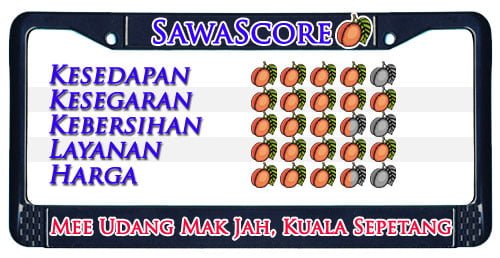
Dan akhir sekali… inilah dia SawaScore dari kami
Things To Do When You Got Your Unifi RG TMRND Wifi Router

Hello again. OK..just to share a little bit about Unifi as TM has already changed their wifi router from D-Link Dir-615 to Riger RG TMRND Gen1.0 recently in some installations. So the same issue here which is the lack of security configured by default.

As I mentioned earlier, by default, the wireless router was configured with default settings and most of the security settings was not configured and not secured. Those unconfigured Unifi wifi router will be a wonderful place for people like me to make it as a ‘playground’ hotspots. heheheh!!!!!

So, let me share a little bit on how to make your Unifi  Riger RG TMRND Gen1.0 wifi router secure and to make it harder for those “unwanted guest”.

BEFORE I PROCEED, DO THIS AT YOUR OWN RISK OK!!!! DON’T BLAME ME IF THERE IS ANY FAILURE HAPPENED TO YOU!!!!!

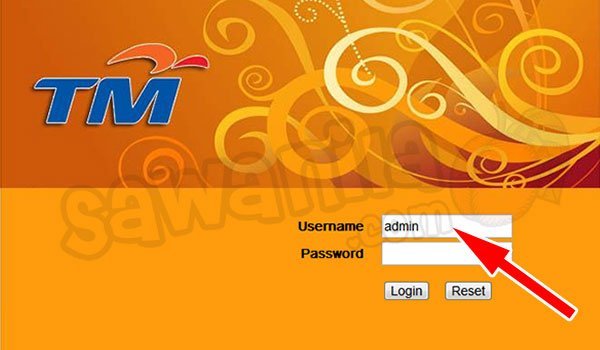
By using your browser, go to http://192.168.0.1 (by default) to the router administration page. Key-in the Username as admin and just leave it blank for the password. In other words, there is no password needed to login into the administration page.

Figure 1

1. Change the ‘admin’ password

By default the wifi router comes with admin id and no password configured… so.. sendiri mau ingat la when your wifi router without admin password. You can configure it at Management tab >> User Management  then click Edit button.

Figure 2

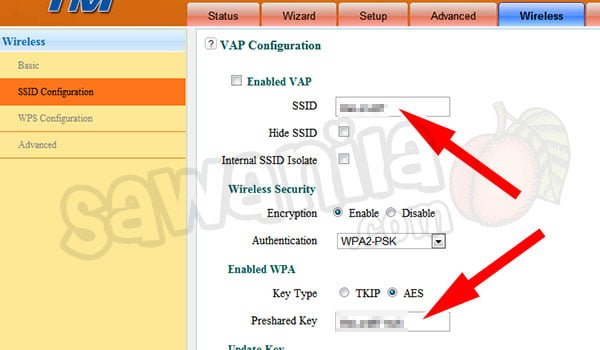
2. Change the SSID Name

by default the SSID name is <your-unifi-id>@unifi, so people knews that it is a default setting by Unifi and can play around with it. You can change the SSID name at Wireless tab >> SSID Configuration and click Edit Button. Key-in your desire SSID name as shown in Figure 3.

Figure 3

3. Change the Wifi Security Key

By default, it was not configured; and if configured, it used the 8 digit numeric pin only which can be easily being cracked by people like me. To do this, from the Step 2 and Figure-3 above, make sure the Authentication mode is WPA2-PSK and key in yourPreshared Key with a strong alphanumeric key. *By changing this Wifi Security Key – all your wifi clients (PC, Notebook, Ipad, PDA…) need to reconnect and use the new WPA/WPA2 key.

Figure-4

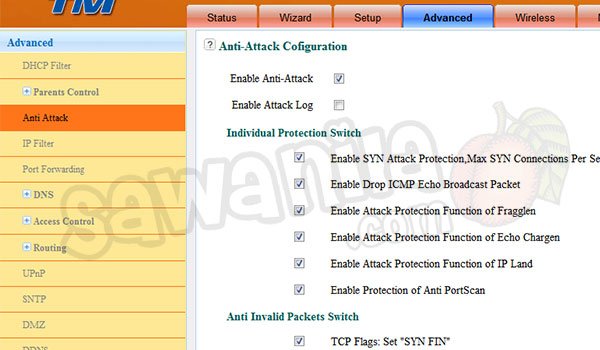
4. Enable Anti Attack Mode

In some cases, this feature are already enabled but as a precaution and confirm the Anti Attack Mode is activated you can go to Advance tab >> Anti Attack. Just enable by tick all the boxes except Enable Attack Log.

Figure 5

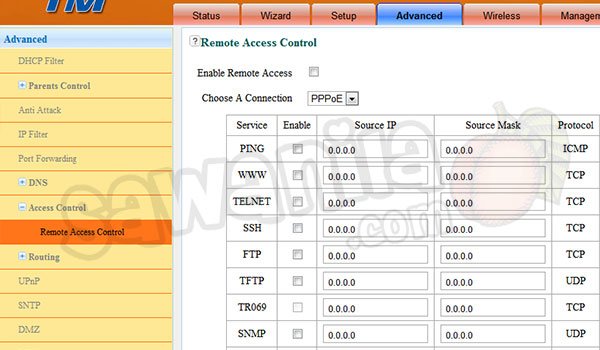
5. Disable Remote Access

To make sure that nobody can access your wifi router, just disable the Remote Access feature. You can do this at Advance tab >> Remote Access Control. Just untick all for total block. If you want to enable ping, advice to enable only for local ping only which is source ip 192.168.0.0 with source mask 255.255.255.0 only…..

Figure 6

6. Change Wireless Bandwidth Frequency to 20MHz

By default, it was configured with 20/40Mhz. This what I’ve discovered. If the bandwidth frequency is 20/40Mhz, the wifi signal is weak and the distance shorter compared if you set the bandwidth to 20Mhz only. And one more thing, some of the wifi devices such as Apple devices (Ipad, Imac, Ipod.. bla bla bla) are more stable running with 20Mhz only. You can do this at Wireless tab >>Basic.

Extra info

Adding Wifi Repeater – you can use a wifi repeater to extend your wifi coverage. In most 2 storey houses, the best way to cover all area by using a wifi repeater. There are many wifi repeater that compatible with Unifi Riger RG TMRND.  I’m using Aztech Wall-Plugged Wireless-N Extender WL556E to extend my home wifi.

Replacing the Riger RG TMRND 

If you don’t like Riger RG TMRND Unifi Router provided by TM, you can replace it with a few selected models and need  to Flash the router with the Custom Firmware. Ask the sales person from Lowyat or elsewhere about the Unifi Router Custom Firmware or else, you can say bye-bye for your Unifi IPTV.

My advice, if you want to replace the Unifi router, get the best one which have the gigabit ethernet and N+ 300Mbps wifi or better. The models that are compatible with Unifi  are: