
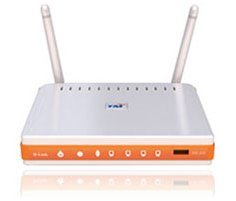
 I just subscribed to Unifi and what I can say is the internet service is superb (for time being la)… and today I want to share a little bit about the wireless security which is a MUST be configured at the D-Link Dir-615 wireless router provided by TM.
By default, the wireless router was configured with default settings and most of the security settings was not configured and not secured. Those unconfigured Unifi wifi router will be a wonderful place for people like me to make it as a ‘playground’ hotspots.
For those who are security concern about their wifi security, these few steps could help you to reduce the risk of the ‘unwanted guest’ from being part of your wifi users.
By using your browser, go to http://192.168.0.1 (by default) to the wifi administration page. Key-in the Username as admin and just leave it blank for the password. In other words, there is no password needed to login into the administration page.
BEFORE YOU PROCEED, DO THIS AT YOUR OWN RISK OK!!!! DON’T BLAME ME IF THERE IS ANY FAILURE HAPPENED TO YOU.
UPDATED (26-Sep-2011)
– TM has changed the default password for the unifi but as it is an open secret.. the password combinations mostly are:
UserName : admin
Pass : (Leave it Empty)
UserName : admin
Pass : telekom
OR
UserName : operator
Pass : telekom
UserName : operator
Pass : h566UniFi
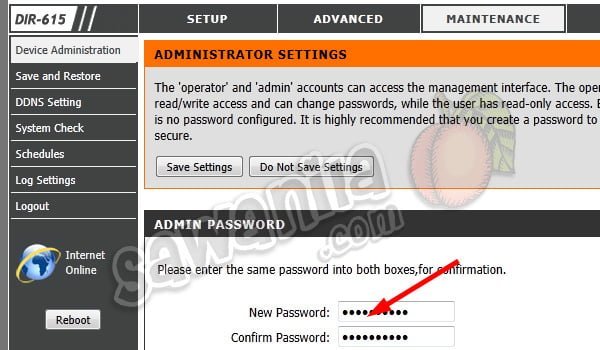
1. Change the ‘admin’ password – by default the wifi router comes with admin id and no password configured… so.. sendiri mau ingat la when your wifi router without admin password. You can configure it at ‘Maintenance’ tab and ‘Device Administration’
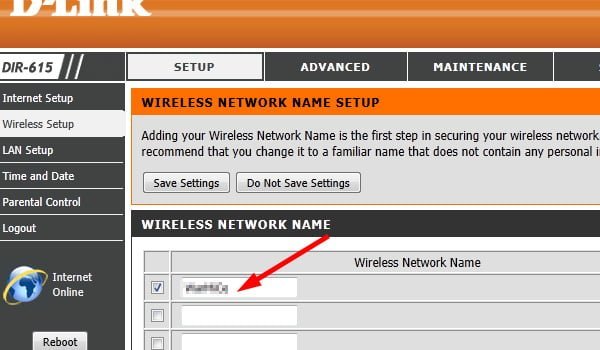
2. Change the SSID Name – by default the SSID name is <your-unifi-id>@unifi, so people knews that it is a default setting by Unifi and can play around with it. You can change the SSID name at ‘Setup’ tab and ‘Wireless Setup’. Click ‘Multiple Wireless Network Name (SSIDs)‘ and change under ‘Wireless Network Name’.
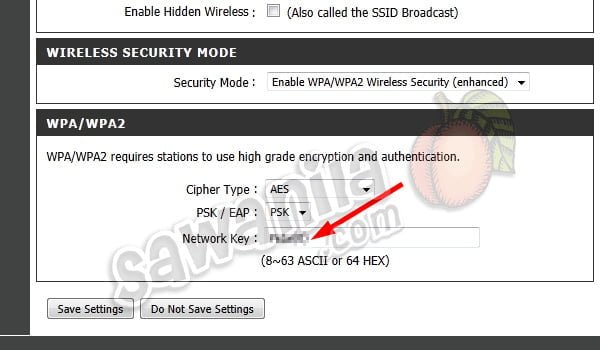
3. Change the Wifi Security Key – by default, it was not configured; and if configured, it used the 8 digit numeric pin only which can be easily being cracked by people like me. To do this, go to ‘Setup’ tab and ‘Wireless Setup’ under ‘Wireless Security Mode’ change to ‘Enable WPA/WPA2…’ and key in your WPA/WPA2 Network Key with a strong alphanumeric key. *By changing this Wifi Security Key – all your wifi clients (PC, Notebook, Ipad, PDA…) need to reconnect and use the new WPA/WPA2 key.
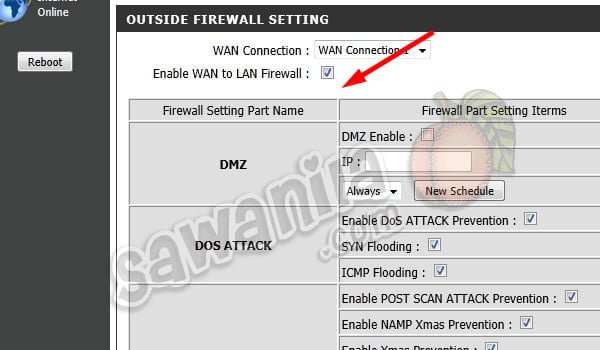
4. Enable WAN to LAN Firewall – by default, this was disabled. So, your wifi router was not protected by any firewall. To enable the firewall features, go to ‘Advance’ tab and ‘Firewall & DMZ’. Just tick the ‘Enable WAN to LAN Firewall’
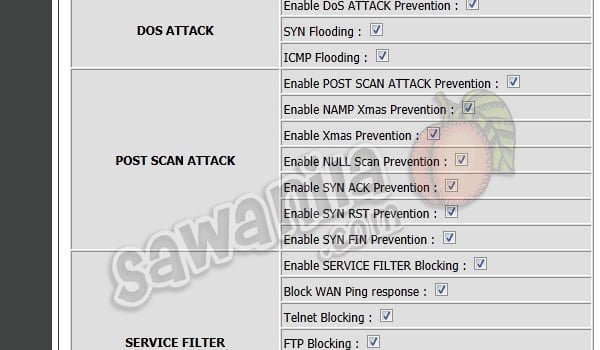
5. Block WAN Ping Responce, Block FTP, Block Telnet and what so ever. From the step 4 above, just enable a few other extra security features as described. It will enhance your firewall security.

6. Change Wireless Bandwidth Frequency to 20MHz – By default, it was configured with 20/40-Mhz Auto. This what I’ve discovered. If the bandwidth frequency is 20/40Mhz, the wifi signal is very weak and the distance shorter. I’ve placed my wifi router in the living hall and couldn’t connect from my room, so once I’ve change to 20Mhz, I found that the signal is stronger and easily manage to connect with ease. You can change the Wireless Bandwidth Frequency at ‘Advance’ tab and ‘Advance Wireless’, change the bandwidth to 20Mhz only.
UPDATED 27-10-2011
Unifi Router Replacement
If you don’t like Dlink DR-615 Unifi Router provided by TM, you can replace the wifi router provided by TM with a few selected models and need to Flash the router with the Custom Firmware. Ask the sales person from Lowyat or elsewhere about the Unifi Router Custom Firmware or else, you can say bye-bye for your Unifi IPTV.
My advice, if you want to replace the Unifi router, get the best one which have the gigabit ethernet and N+ 300Mbps wifi or better. The models that are compatible with Unifi are:
- Asus – RT-N13U <- Highly Recommended (cheap, build in BT downloader)
- Asus – RT-N56U <- for those got money… don’t regret to use this one.. triple highly recommended….
- Asus – RT-N16
- TP-Link – TL-WR841ND
- TP-Link – TD-W8960N
- TP-Link – TL-WR1043ND <- Recommended
Updated 10-01-2012
Extending Wifi Coverage
Hi again, almost everyday I got email, sms, queries about extending the DIR-615 wifi coverage where Dir-615 router unable to cover all areas especially in 2 storey houses. Yes, I 101% agree that Wifi router Dir-615 provided by TM are es-you-si-kay.
The easiest way to extend wifi coverage by adding a wifi repeater or wifi bridge to work along with the Dir-615 router. Just place the wifi repeater in the weak spot location and it will increase the wifi signal tremendously.
There are many wifi models that supports these features. Just go and ask the shop at Low Yat or similar places about the wifi repeater/bridge.
These are a few suggested model from me:
- Asus RT-N10+
- Asus RT-N12+
- Asus RT-N13U+
- TP-Link TL-WA801ND
- And many others
 At last… I use the Aztech Wall-Plugged Wireless-N Extender WL556E to extend my home wifi coverage. Worth buying, now no more blind spots and I can extend up to 300Mbps of wifi speed. Just configured this baby as wifi repeater and it was kacangly easy.
Okla.. that’s all folks…. enjoy your Unifi.. and for those who don’t subscribe yet to Unifi….. get it now…
- RELATED POST : Things To Do When You Got Your Unifi RG TMRND Wifi Router
- NEW RELATED POST: Things To Do When You Got Your Unifi TRG212M Wifi Router



 Assalamualaikum orang kampung….
