RSS
 

Archive for the ‘Tips & Guides’ Category

6 Things To Do when you got your Unifi Wireless Router D-Link Dir-615


02 Mar 2011

I just subscribed to Unifi and what I can say is the internet service is superb (for time being la)… and today I want to share a little bit about the wireless security which is a MUST be configured at the D-Link Dir-615 wireless router provided by TM.

By default, the wireless router was configured with default settings and most of the security settings was not configured and not secured. Those unconfigured Unifi wifi router will be a wonderful place for people like me to make it as a ‘playground’ hotspots.

For those who are security concern about their wifi security, these few steps could help you to reduce the risk of the ‘unwanted guest’ from being part of your wifi users.

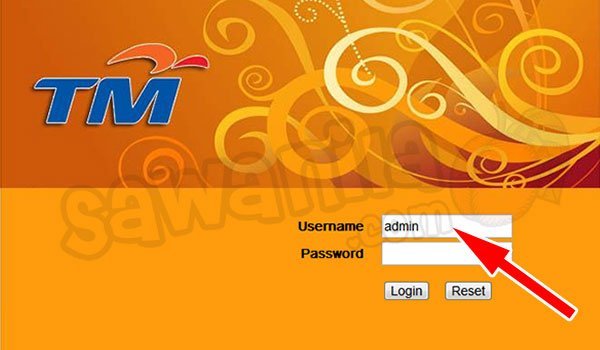
By using your browser, go to http://192.168.0.1 (by default) to the wifi administration page. Key-in the Username as admin and just leave it blank for the password. In other words, there is no password needed to login into the administration page.

BEFORE YOU PROCEED, DO THIS AT YOUR OWN RISK OK!!!! DON’T BLAME ME IF THERE IS ANY FAILURE HAPPENED TO YOU.

UPDATED (26-Sep-2011)

- TM has changed the default password for the unifi but as it is an open secret.. the password combinations mostly are:

UserName : admin
Pass : (Leave it Empty)

UserName : admin
Pass : telekom

OR

UserName : operator
Pass : telekom

UserName : operator
Pass : h566UniFi

1. Change the ‘admin’ password – by default the wifi router comes with admin id and no password configured… so.. sendiri mau ingat la when your wifi router without admin password. You can configure it at ‘Maintenance’ tab and ‘Device Administration’

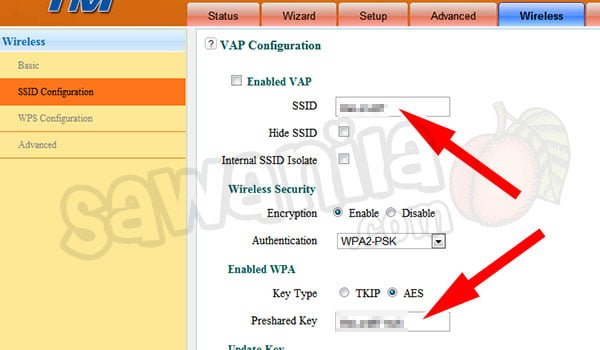
2. Change the SSID Name – by default the SSID name is <your-unifi-id>@unifi, so people knews that it is a default setting by Unifi and can play around with it. You can change the SSID name at ‘Setup’ tab and ‘Wireless Setup’. Click ‘Multiple Wireless Network Name (SSIDs)‘ and change under ‘Wireless Network Name’.

3. Change the Wifi Security Key – by default, it was not configured; and if configured, it used the 8 digit numeric pin only which can be easily being cracked by people like me. To do this, go to ‘Setup’ tab and ‘Wireless Setup’ under ‘Wireless Security Mode’ change to ‘Enable WPA/WPA2…’ and key in your WPA/WPA2 Network Key with a strong alphanumeric key. *By changing this Wifi Security Key – all your wifi clients (PC, Notebook, Ipad, PDA…) need to reconnect and use the new WPA/WPA2 key.

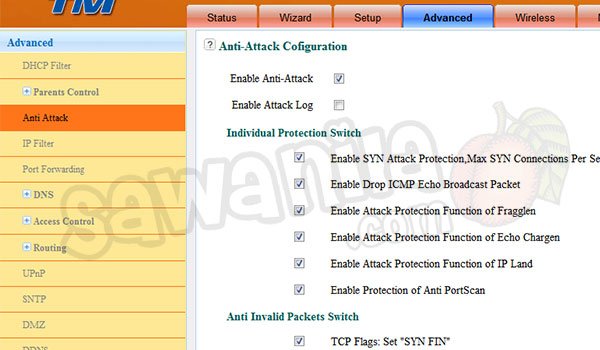
4. Enable WAN to LAN Firewall – by default, this was disabled. So, your wifi router was not protected by any firewall. To enable the firewall features, go to ‘Advance’ tab and ‘Firewall & DMZ’. Just tick the ‘Enable WAN to LAN Firewall’

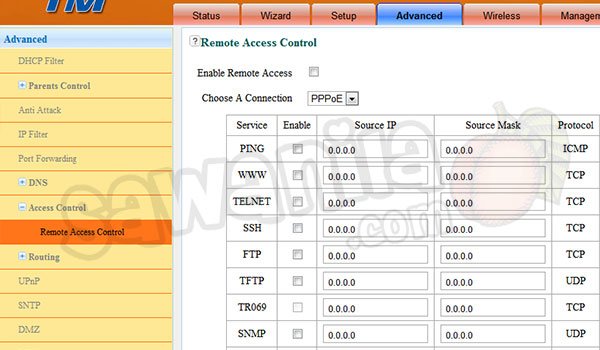
5. Block WAN Ping Responce, Block FTP, Block Telnet and what so ever. From the step 4 above, just enable a few other extra security features as described. It will enhance your firewall security.

6. Change Wireless Bandwidth Frequency to 20MHz – By default, it was configured with 20/40-Mhz Auto. This what I’ve discovered. If the bandwidth frequency is 20/40Mhz, the wifi signal is very weak and the distance shorter. I’ve placed my wifi router in the living hall and couldn’t connect from my room, so once I’ve change to 20Mhz, I found that the signal is stronger and easily manage to connect with ease. You can change the Wireless Bandwidth Frequency at ‘Advance’ tab and ‘Advance Wireless’, change the bandwidth to 20Mhz only.


UPDATED 27-10-2011

Unifi Router Replacement 

If you don’t like Dlink DR-615 Unifi Router provided by TM, you can replace the wifi router provided by TM with a few selected models and need  to Flash the router with the Custom Firmware. Ask the sales person from Lowyat or elsewhere about the Unifi Router Custom Firmware or else, you can say bye-bye for your Unifi IPTV.

My advice, if you want to replace the Unifi router, get the best one which have the gigabit ethernet and N+ 300Mbps wifi or better. The models that are compatible with Unifi  are:

Updated 10-01-2012

Extending Wifi Coverage

Hi again, almost everyday I got email, sms, queries about extending the DIR-615 wifi coverage where Dir-615 router unable to cover all areas especially in 2 storey houses.  Yes, I 101% agree that Wifi router Dir-615 provided by TM are es-you-si-kay.

The easiest way to extend wifi coverage by adding a wifi repeater or wifi bridge to work along with the Dir-615 router.  Just place the wifi repeater in the weak spot location and it will increase the wifi signal tremendously.

There are many wifi models that supports these features. Just go and ask the shop at Low Yat or similar places about the wifi repeater/bridge.

These are a few suggested model from me:

  • Asus RT-N10+
  • Asus RT-N12+
  • Asus RT-N13U+
  • TP-Link TL-WA801ND
  • And many others
UPDATED: 02 Feb 2012
At last… I use the Aztech Wall-Plugged Wireless-N Extender WL556E to extend my home wifi coverage. Worth buying, now no more blind spots and I can extend up to 300Mbps of wifi speed. Just configured this baby as wifi repeater and it was kacangly easy.
Secondly, this Aztech wall plugged works great with my existing wifi router Asus RT-N56U which I bought earlier to replace the crappy Dir-615. It is fully compatible with Unifi.


Okla.. that’s all folks…. enjoy your Unifi.. and for those who don’t subscribe yet to Unifi….. get it now…


Tags:

Korang dah guna Gravatar ke Belum???


18 Feb 2011

Salam Semua,

Nak tanya skit… korang semua dah guna Gravatar ker belum??? Kalau yang belum tu.. Gravatar nih adalah tempat letak gambar avatar korang yang dikenali seluruh dunia. Kebanyakkan aplikasi blog memang kenal Gravatar nih cthnye wordpress, blogger dan macam macam lagi.

Apa bagus sangat dengan Gravatar nih?? Takde bagus mana pon.. cuma kita perlu letak gambar avatar kita kat situ aja dan kebanyakkan blog/site dalam dunia ni akan guna gambar kita dari Gravatar nih.

Kena bayar ker? Korang kene register aja dan selain tu FREE.

Camne Gravatar tu kenal kita? Gravatar tu kenal kita melalui email address kita. Kita pula boleh tambah seberapa banyak email address dalam satu account.. so boleh letak banyak gambar mengikut email address kita tu.

Sawanila.com guna Gravatar ni kat mana.?? hehehe… tu gambar korang nampak kat Comments dan Top Commentators tu.. kalau korang tak guna Gravatar nih.. tak nampak ler gambar korang…..


Tags:

Memilih Bag DSLR


21 Jan 2011

Assalamualaikum,

Kali ini saya ingin membincangkan tentang bag DSLR. Tentu ramai dikalangan anda yang masih tertanya-tanya bag DSLR yang mana paling sesuai? Jawapannya mari kita rungkaikan satu per satu. Mari kita tengok kategori-kategori bag DSLR yang ada dipasaran sekarang…

Rollers Bags

Bag jenis Rollers atau sorong ini sesuai digunakan oleh golongan professional photographer yang ingin menyimpan banyak barang dan selalu travel jejauh. So…. sumbat jer semua barang dalam bag tu dan you are good to go. Biasanya beg jenis nih boleh menyimpan paling kurang 2 body dan 4 lens bersaiz sederhana. Kalu nak simpan lens serombong kapal pon boleh cuma kene korbankan ruangan yang lain ler. Disamping itu, gadget-gadget lain seperti flash, charger, dan lain-lain lagi dalam satu beg.

Kelemahannya cuma satu jer… Bulky. Besor ya amat dan berat pon boleh tahan gaks.. Sendiri mau ingat la kan.. semua barang sumbat dalam satu beg.. Satu lagi…ciri-ciri keselamatan pon kene jaga gaks beb… kalau ler beg tu hilang tgh jalan.. huhuhuhuh… nangis tak berlagu beb…

Shoulder Bags

Shoulder bags or saya suka guna nama “beg pion” nih selalu diorang kasi free semasa beli kamera. Beg ni oklah untuk digunakan oleh photog newbie or baru starts menembak. Barang-barang boleh disimpan dan dicapai dengan senang. Beg sandang nih pon ada banyak jenis dan bergantung kepada saiz dia… ada yang besar dan ada yang cinonet…

Kelemahan dia cuma satu jer… bahu terasa sangat sakit.. so terpaksa tukar-tukar.. kejap bahu kiri.. then bila sakit.. tukar sebelah kanan plak… Lepas tu plak.. kalu kita berjalan, beg nih bergoyang-goyang or berayun-ayun sekali… sangat tidak sesuai untuk perahu-perahu kecil yang ada kat dalam beg tu.. takut peralatan dalam beg tu raser pening dan cepat ghosakkk…. Secara peribadi saya pernah guna shoulder beg ni sehari jer.

Bagpacks Bags

Hah!…. Bagpacks or beg galas nih yang paling famous sekali dan paling banyak digunakan. Saya sangat syorkan untuk simpan satu bag yang ni jika anda seorang photographer.. tak kiralah photog sekadar hobi or cari makan.. Mesti simpan satu.

Bag jenis ni sangat sesuai untuk simpan banyak barang dan peralatan. Senang untuk dibawa kemana-mana… galas jer letak kat belakang n you’re good to go. Lepas tu plak.. ada jenis begpack yang tersedia slot notebook.. so boleh sumbat notebook terus dlm bagpack nih. takyah ada beg lain untuk notebook.

Kelemahan beg jenis ni cuma satu jer.. mengganggu perahu-perahu lain semasa menjalankan tugas.. Maksud saya… contohnye semasa menembak kalu pakai beg nih kat belakang.. ia sangat mengganggu orang lain dan persekitaran.. kekadang tu kawasan menembak tu sempit… sure eksiden punye terlanggar tu la terseret ni la kalu pakai begpack ni kat belakang… so ada skit menyusahkan ler semasa buat kerja….

Sling Bags

Sling bag nih seakan-akan backpacks cuma sling bag nih ada satu tali galas aja berbanding dua untuk bagpacks. Tujuan diorang design satu tali galas tu sebabnya untuk memudahkan mencapai barang dalam bag dengan meletakkan beg kat tepi. Saya pernah pakai beg jenis ni… memang senang nak capai barang dan boleh simpan banyak barang dalam satu beg… Beg ini saya katakan memang sesuai sangat untuk menembak di kawasan outdoor.

Cuma kelemahannya, bahu terasa sakit bila bawak kehulu dan kehilir. Selain drp tu… memang mengganggu perahu-perahu lain semasa menembak dikawasan yang sempit dan sibuk… so masa menembak tu.. terpaksa berhati-hati la…

Belt Packs

Kepada yang suka travel dan tak perlu bawa banyak barang.. beg pingggang si tersangat-sangat-sangat sesuai. Macam saya yang selalu travel nih.. kejap terbang sana.. kejap terbang sini… saya gunakan belt packs aja.. apa yang saya perlukan hanyalah satu body, satu lens malas (18-200mm), satu lens wajib (50mm) dan charger.. so beg ni sangat sesuai digunakan. Pas tu plak.. tak risau dan tidak membahayakan perahu-perahu lain… ikat jer kat pinggang then terus jalan… kerja menembak pon senang sbb tiada halangan untuk bergerak…. Capaian barang-barang sangat-sangat senang…. tak perlu letak beg… tengah berjalan pon boleh amik dan simpan barang

kelemahan dia ada gaks… Takbleh nak simpan banyak barang… dan kalau ada lens serombong kapal tu.. takbleh dah nak simpan……

Modular

The ultimate bag adalam jenis modular… Tanya lah semua photog otai semua… beg apa yang paling sesuai.. dorang mesti cakap ko pi cari Modular Harness seketul pas tu Modular belt satu… then cari modular packs untuk barang-barang lain.

Tujuan utama adalah ianya sangat-sangat 1000 kali sangat senang nak capai barang-barang. Pas tu plak.. modular tu memang sesuai untuk peralatan.. contohnye… untuk flash.. cari modular untuk flash.. ikat modular tu pada harness or belt.. selesai… Nak bawa apa barang pon ada.. just sangkut jer kat mana-mana… sekali saya pakai modular nih.. rasernye taknak lagi pakai beg lain ler masa menembak…… Kalu pakai benda nih.. memang tak raser sakit langsung… selesa jer.. raser sengal bahu pon takde walaupon dan menembak 8-10 jam… stedi jer…

Kelemahannye ada gaks… sapa kata takde… modular nih hanya sesuai digunakan semasa menembak.. tapi kalu nak travel naik kapal torbang ko.. orang cakap ko orang gila… sbb barang bergantung macam Din Beramboi dlm majalah Ujang tu…. So kene bawak gaks la beg sampingan kalu nak travel……..

Kesimpulan

Memang ada macam-macam jenis bag untuk DSLR terchinta tu dipasaran.. apa yang kita perlu tahu adalah…

  1. kegunaan beg tu
  2. barang yang kita ada
  3. keselesaan kita

dan yang lain-lain tu….. tepuk dada tanya selera………

Sekian….


Tags: , ,

Jadual Waktu Solat 2011 – Kuala Lumpur


20 Jan 2011

Assalamualaikum,

Kepada sesiapa yang ingin mendapatkan Jadual Waktu Solat 2011 bagi kawasan Kuala Lumpur dan kawasan-kawasan yang sama waktu dengannya bolehlah download kat sini….

http://sawanila.com/v10/wp-content/uploads/2011/01/Waktu-Solat-2011.pdf

Sumber : http://www.e-solat.gov.my/


Tags:

You Must To Do This Immediately


22 Dec 2010

Salams. For those that use notebook, laptop, netbook or what so ever that has a build-in webcam, you have to do this immediately. Did you know that somebody might watching you without you realizing it and the best part is, the led light was off even the webcam is active. So you can’t notice the webcam is active.

From what that I’ve tested today, with a proper tools, the webcam can be controlled remotely and nobody can notice it. What was discovered only video traffic was transferred through the network.

So, what you need to do is go back to the old school method. By using a sticky note paper, stick it and cover your webcam. If you want to use your webcam, just fold the sticky paper.. That’s solved the problem.

……. DO IT NOW!….. before too late…

adios… kheirul


Tags: